
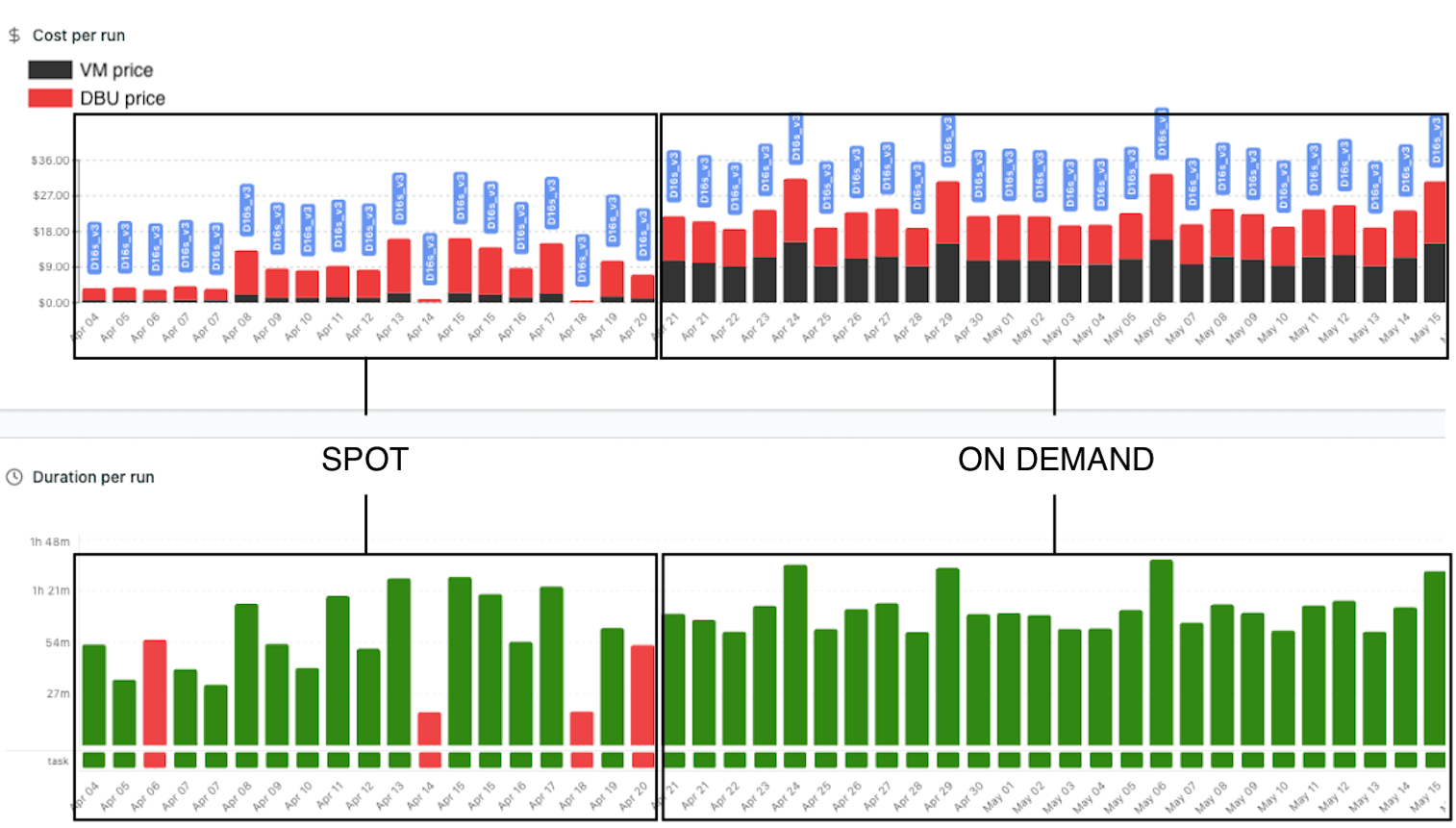

Spot instances can cut Databricks compute costs significantly — but they come with trade-offs. This case study shows real workload examples analyzed using Lakesight, highlighting possible costs cuts offered by Spot instances as well as their limits.
Context
When configuring a Databricks cluster, an impactful decisions is the choice between On-demand and Spot (Preemptible on GCP) instances for worker nodes.
- On-demand instances: are allocated exclusively to your workload and run until you terminate them. Price is higher, but you get reliability and no interruptions.
- Spot instances: use spare cloud capacity at a significant discount (often 60-80% cheaper). However, they can be reclaimed by the cloud provider at any time with little or no warning.
This price reduction for Spot instances only apply to the VM costs and has no impact on Databricks costs (DBU/h) which remains unchanged.
First example: switching from on-demand to spot instance on a light workload
The example below shows a workload whose underlying cluster has been switched from On-demand to Spot.
The job runs in 25mn in average and is configured to auto-scale with min workers=1 and max workers=12. It uses Azure instance Standard_D16s_v3 with associated costs detailed in the table below.

Standard_D16s_v3 DBU and VM prices (Jun. 2026)
As shown in the previous table, the Spot VM price is more than 5 times lower the the equivalent On-demand VM price, the Databricks cost remains unchanged.
Here is what Lakesight Analyze a job shows:
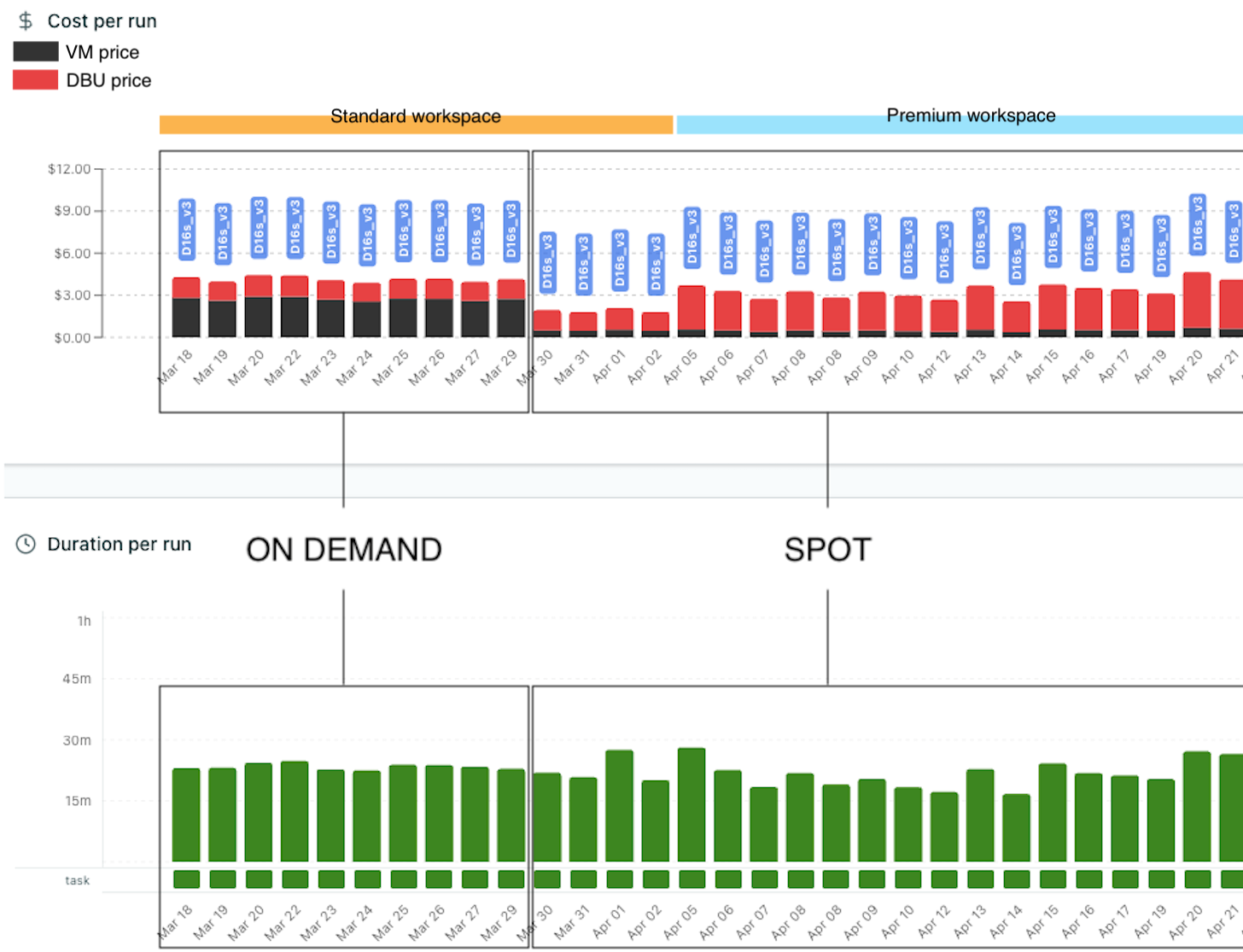
Lakesight - Analyze a job - Spot VS On-demand
What the data shows
Phase 1 — Switch from On-demand to spot on March 30th
We clearly see the impact on costs of switching from On-demand to spot. VM costs have drastically lowered and become almost negligible while DBU costs remains unchanged.
Phase 2 — Databricks workspace upgrade from Standard to Premium on April 5th
From April 5th, we see a significant increase in DBU costs. Actually, it doubled because of workspace from Standard ($0.15/DBU) to Premium ($0.3/DBU). See Costs calculation page for more information on cloud providers pricing.
Here we see that for this light workload, switching from On-demand to Spot is clearly a good choice, with success rate remaining 100%. But we'll see in the next example that Spot instances should be used carefully, as they come with reliability trade-offs.
Second example: switching from on-demand to spot instance on a heavier workload
The job in this example is a heavy daily ETL pipeline running on Azure Databricks. The job runs in 1h to 1h30min depending on the volume of data to process, and is configured to auto-scale with min workers=1 and max workers=12. It also uses Azure instance Standard_D16s_v3 (see associated costs in the previous example).
Here is what Lakesight Analyze a job shows:
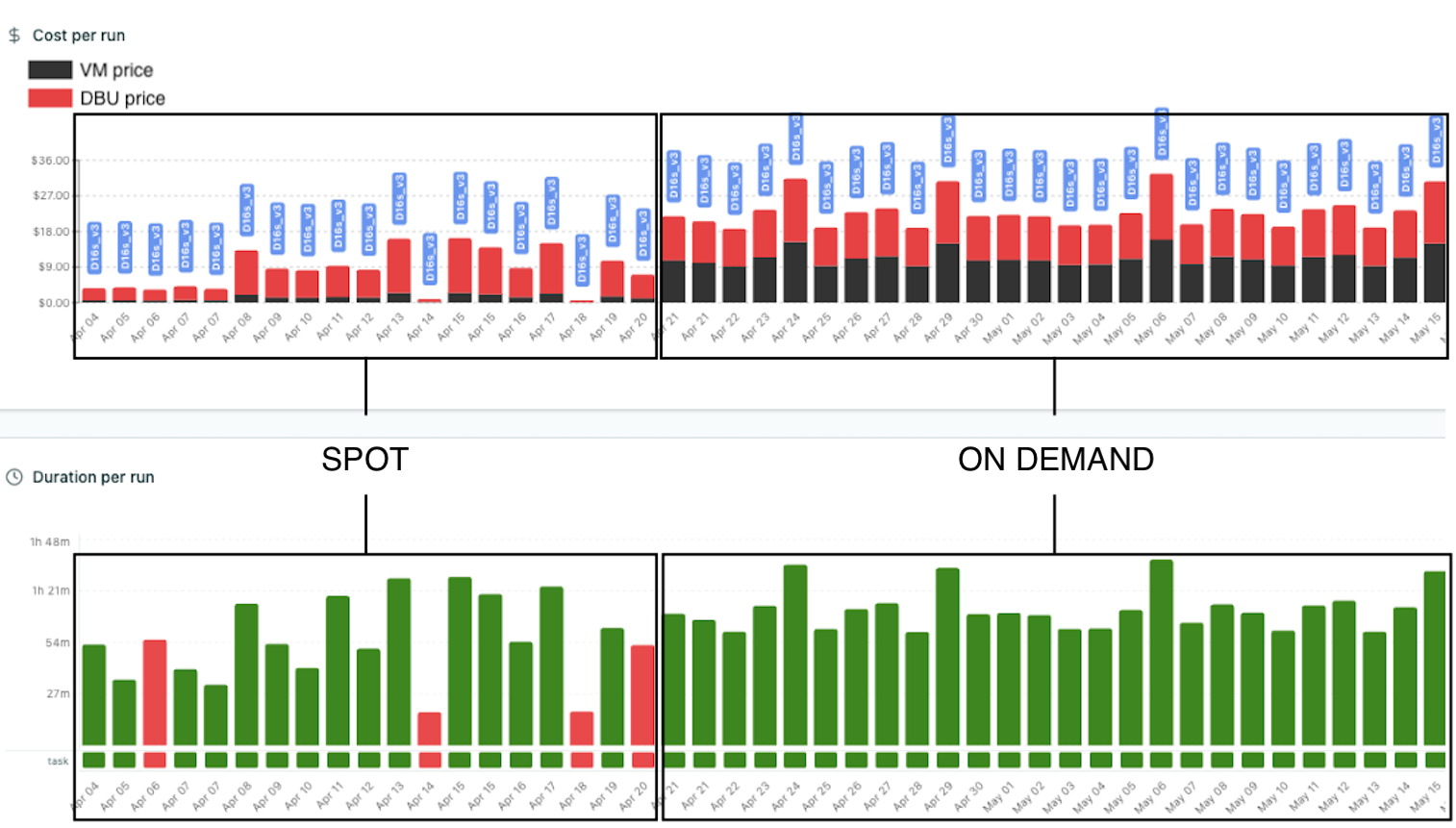
Lakesight - Analyze a job - Spot VS On-demand on a heavier workload
What the data shows
Phase 1 — Spot instances
During the first phase, the job ran on Spot instances. Looking at the cost chart, the pattern is clear:
- Costs are low: significantly cheaper than On-demand, as expected
- Duration is highly variable: some runs complete in less than a hour, others take nearly 1h30min
- Occasional failures: Spot evictions cause task retries or full job failures (driver became unhealthy error)
The variability in duration is the key observation. When Spot instances are reclaimed mid-execution, Databricks needs to acquire replacement nodes and re-execute the interrupted tasks. This adds time — sometimes a lot of it. Even when the job doesn't fail outright, the duration penalty can be substantial.
Phase 2 — On-demand instances
On April 21, the job failed. A Spot eviction at a critical stage caused a failure that couldn't be recovered. The team decided to switch to On-demand instances.
After that switch, the picture changed significantly:
- Higher costs per run: as we saw previously, for this instance, Spot VM price is more than 5 times lower the the equivalent On-demand VM price
- Duration is remarkably stable: runs consistently complete in approximately the same time window
- No failures: success rate becomes 100%
The consistency is striking. Without Spot evictions interrupting execution, every run follows a predictable pattern. There's no variance from node reclamation, no wasted compute from retries, no cascading delays.
The trade-off
These two examples tell different stories. The first workload — light, fast, single-task — ran perfectly fine on Spot with a 100% success rate and significant cost savings. The second — heavier, longer, more resource-intensive — suffered from variable durations and repeated failures on Spot, making On-demand the better choice despite the higher per-run price.
The point is: Spot savings are real, but they're not free. On heavier workloads, you pay for that discount in other ways:
- Failed runs waste compute. A job that fails at 80% completion has consumed resources without producing output. If retries are configured, costs add up even further.
- Variable duration means variable cost. A run that takes 1h30 instead of 50min costs more in both VM-hours and DBU-hours — even at Spot prices.
- Someone has to deal with failures. Investigating, restarting, and verifying a broken pipeline takes engineering time that doesn't appear on the cloud bill.
For light workloads that complete quickly and tolerate the occasional hiccup, Spot is often a clear win. For heavier pipelines where reliability matters — jobs that feed dashboards, trigger downstream processes, or must finish before a deadline — On-demand is usually worth the extra cost.
How Lakesight helps
This kind of analysis is exactly what Lakesight's Analyze a Job feature is built for:
- Cost and duration side by side: both VM and DBU costs per run, with duration trends, so you can see the full impact of a configuration change
- Billing type visibility: each run's tooltip shows whether it ran on Spot or On-demand, making it easy to correlate billing type with cost and duration patterns
- Node type color-coding: bars are color-coded by the instance type used, so configuration changes are immediately visible in the chart
- Historical comparison: no time limit on history — you can compare months of data before and after a change
In this case study, one look at the charts was enough to confirm that switching to On-demand was the right call for this specific workload. The cost per run increased, but the total cost of ownership — including failed runs, wasted compute, and engineering time — decreased.
Takeaway
The Spot vs On-demand decision isn't one-size-fits-all. It depends on the workload's tolerance for interruption, the cost of failure, and the value of predictability.
The best way to make this decision is to measure it. Run your workload on both configurations, compare the results, and let the data guide you. Lakesight makes this comparison trivial.
Lakesight supports Databricks workspaces on Azure, AWS, and GCP. Questions? Reach out at support@lakesight.io.